Data and privacy
The activity log contains Atlassian account IDs, so it is personal data. On the Data and privacy tab a Jira administrator decides how the log is kept, and can delete or anonymize entries.
Open Jira admin settings → Marketplace apps → Issue Link Guard → Data and privacy. The tab has three parts: Settings, Actions and Log status.
Settings
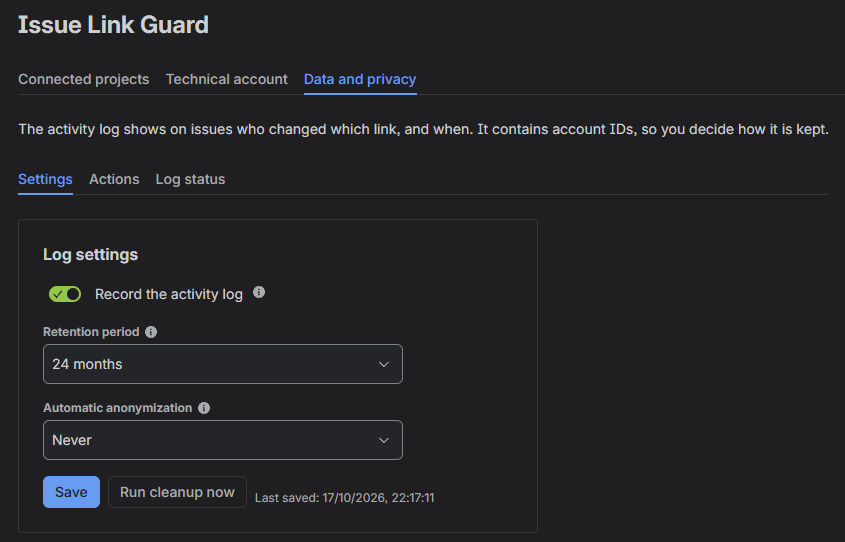
| Setting | Default | Effect |
|---|---|---|
| Record the activity log | On | Off: new link changes are not recorded and the Issue Link Guard tab disappears from issues. Existing entries stay and come back when you turn the log on again. |
| Retention period | 24 months | A daily job deletes older entries. Options: 1, 3, 6, 12, 24, 36, 48 or 60 months, or Never, which keeps entries until you delete them yourself. |
| Automatic anonymization | Never | Removes the person from entries older than the chosen period; the entry itself stays (what changed and when). Options: Immediately (new entries are recorded without the person), after 30 days, 90 days, 6 months or 12 months. The period must be shorter than the retention period. |
Select Save. Settings take effect within a minute; the tab on issues appears or disappears after the page is refreshed.
Actions
These actions cannot be undone. Each one asks for confirmation and shows how many entries it affects.
| Action | Effect |
|---|---|
| Run cleanup now | Applies the saved retention period and anonymization right away, without waiting for the daily job. |
| Delete entries in a date range | Deletes entries from the chosen dates, both inclusive, in your time zone. |
| Delete the whole log | Deletes all entries. The settings stay and new changes keep being recorded. |
| Anonymize one person's entries | Removes the person from their entries and from "last changed by" in the project and technical account settings. Rules that list the person stay unchanged, and their new changes are recorded normally. |
| Anonymize all entries | Removes the person from all entries; the entries stay. To keep new entries without the person too, set automatic anonymization to Immediately. |
Actions cover only entries recorded before you select them. They run in the background, one at a time; progress is shown on the Log status tab.
For the app, deletion is final. Atlassian keeps a backup copy of deleted data for a while and then destroys it.
Log status
| Item | Meaning |
|---|---|
| Activity log | Whether the log is being recorded. |
| Database | How much of the app's database the log uses. Atlassian's limit for one site is 1 GB in production. |
| Entries | About how many entries the log has. |
| Oldest entry | The date of the oldest entry. |
| Last cleanup | When the daily job last ran, and how many entries it deleted and anonymized. |
| Account report to Atlassian | When the app last reported the stored accounts to Atlassian; see below. |
From 80% of the database limit, the admin page shows a warning. From 95%, the activity tab on issues shows a note as well. When the database is full, new entries stop being recorded; links keep working. Delete older entries or shorten the retention period to make room.
Closed Atlassian accounts
Every 7 days the app tells Atlassian which account IDs it stores, as Atlassian requires from all apps. For accounts that were deleted in Atlassian, the app removes the person from the activity log, from "last changed by", and from the project rules that list them.
What the app stores
| Data | Where | Contains |
|---|---|---|
| Activity log | The app's database on Atlassian's cloud (Forge SQL) | Time, action, link type, the issues involved, and the account ID of the person who requested the change. |
| Project configuration | The app's storage on Atlassian's cloud (Forge storage) | Whether control is on, the control mode, the rules, the allowed target projects, and who last saved them and when. Rules can contain project role IDs, group IDs and user account IDs. |
| Technical account and privacy settings | The app's storage | The projects where the technical account is on, who turned it on and when; the log settings. |
| Account report register | The app's storage | The account IDs reported to Atlassian, and whether Atlassian reported the account as deleted. |
| Picker link lists | An issue property on each issue with a picker | Link type, direction and the linked issue's ID for each link added through the picker. |
The app does not store names, email addresses, passwords, tokens or issue content. It runs entirely on Atlassian's infrastructure and sends no data to any outside service.